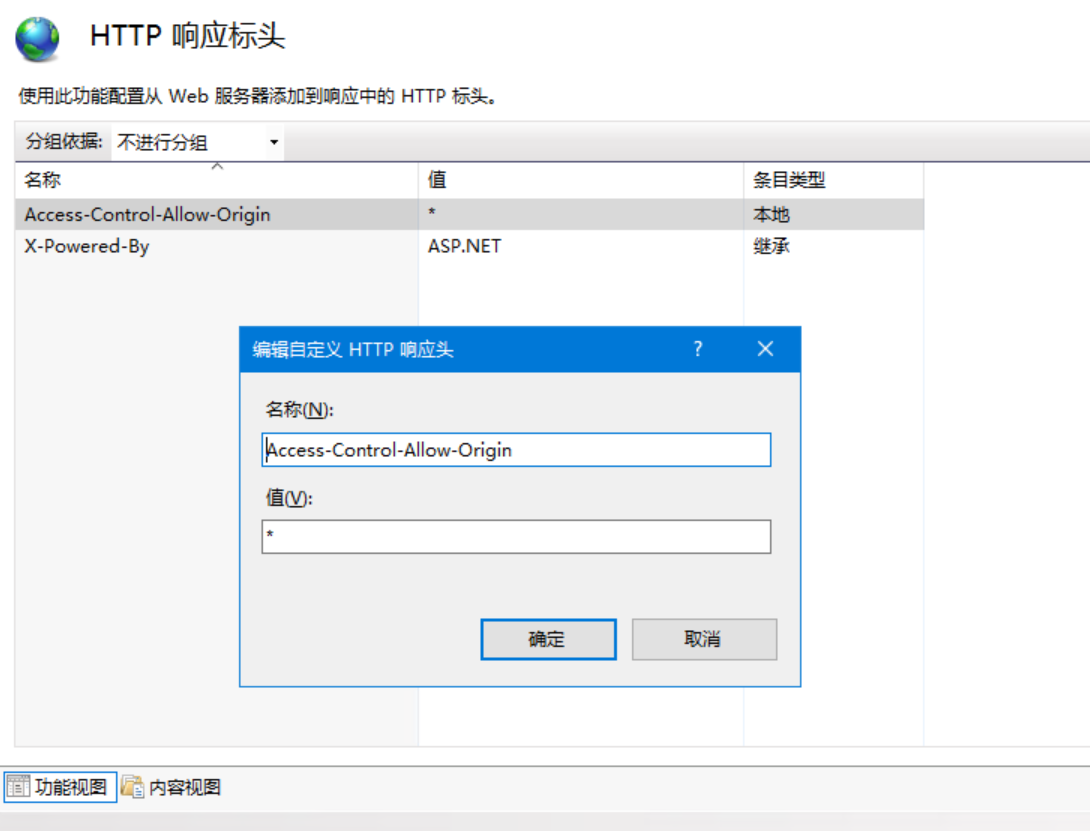
这两天搞个JS跨域请求,发现用户是Windows服务器,用的IIS,而且跨域还是多域名,完了撒.IIS自带的HTTP标头只能填写一个值.特意网上溜达了一圈,发现不少人遇到这个问题都没解决.如下图所示.
默认生成web.config如下:阅读全文 →
这两天搞个JS跨域请求,发现用户是Windows服务器,用的IIS,而且跨域还是多域名,完了撒.IIS自带的HTTP标头只能填写一个值.特意网上溜达了一圈,发现不少人遇到这个问题都没解决.如下图所示.
默认生成web.config如下:阅读全文 →
后台编辑主题的functions.php文件,添加如下代码:
//页面请求次数及打开时间自动检测
function wp_page_speed() {
date_default_timezone_set( get_option( ’timezone_string’ ) );
$content .= ’页面加载时间’;
$content .= timer_stop( $display = 0, $precision = 2 );
$content .= ’ s’;
echo $content;
}然后把如下代码添加到你的主题文件的footer.php中.阅读全文 →
WPJAM插件自带了下面绝大部分功能,推荐使用.
<!–优化代码添加到主题目录functions.php文件–!>
/*彻底关闭自动更新(核心程序/主题/插件/翻译自动更新*/
add_filter(’automatic_updater_disabled’, ’__return_true’);
/*关闭更新检查定时作业*/
remove_action(’init’, ’wp_schedule_update_checks’);
/*移除已有的版本检查定时作业*/
wp_clear_scheduled_hook(’wp_version_check’);
/*移除已有的插件更新定时作业*/
wp_clear_scheduled_hook(’wp_update_plugins’);
/*移除已有的主题更新定时作业*/
wp_clear_scheduled_hook(’wp_update_themes’);
/*移除已有的自动更新定时作业*/
wp_clear_scheduled_hook(’wp_maybe_auto_update’);
/*移除后台内核更新检查*/
remove_action( ’admin_init’, ’_maybe_update_core’ );
/*移除后台插件更新检查*/
remove_action( ’load-plugins.php’, ’wp_update_plugins’ );
remove_action( ’load-update.php’, ’wp_update_plugins’ );
remove_action( ’load-update-core.php’, ’wp_update_plugins’ );
remove_action( ’admin_init’, ’_maybe_update_plugins’ );
/*移除后台主题更新检查*/
remove_action( ’load-themes.php’, ’wp_update_themes’ );
remove_action( ’load-update.php’, ’wp_update_themes’ );
remove_action( ’load-update-core.php’, ’wp_update_themes’ );
remove_action( ’admin_init’, ’_maybe_update_themes’ );
/*关闭程序更新提示*/
add_filter( ’pre_site_transient_update_core’, function($a){ return null; });
/*关闭插件更新提示*/
add_filter(’pre_site_transient_update_plugins’, function($a){return null;});
/*关闭主题更新提示*/
add_filter(’pre_site_transient_update_themes’, function($a){return null;});
//关闭WordPress的XML-RPC功能
add_filter(’xmlrpc_enabled’, ’__return_false’);
//关闭XML-RPC的 pingback端口
add_filter( ’xmlrpc_methods’, ’remove_xmlrpc_pingback_ping’ );
function remove_xmlrpc_pingback_ping( $methods ) {
unset( $methods[’pingback.ping’] );
return $methods;
}
//移除前端网页源代码内的头部冗余代码
remove_action( ’wp_head’, ’feed_links_extra’, 3 );
remove_action( ’wp_head’, ’rsd_link’ );
remove_action( ’wp_head’, ’wlwmanifest_link’ );
remove_action( ’wp_head’, ’index_rel_link’ );
remove_action( ’wp_head’, ’start_post_rel_link’, 10, 0 );
remove_action( ’wp_head’, ’wp_generator’ );
//移除新版本站点健康状态面板和菜单项
add_action( ’admin_menu’, ’remove_site_health_menu’ );
function remove_site_health_menu(){
remove_submenu_page( ’tools.php’,’site-health.php’ );
}
//禁用5.5版后自带的XML站点地图
add_filter( ’wp_sitemaps_enabled’, ’__return_false’ );
//移除后台仪表盘站点健康状态面板
add_action(’wp_dashboard_setup’, ’remove_site_health_dashboard_widget’);
function remove_site_health_dashboard_widget()
{
    remove_meta_box(’dashboard_site_health’, ’dashboard’, ’normal’);
}
//移除后台仪表盘菜单:站点健康状态
add_action( ’admin_menu’, ’remove_site_health_menu’ );
function remove_site_health_menu(){
  remove_submenu_page( ’tools.php’,’site-health.php’ );
}
//移除后台仪表盘菜单:活动、新闻
function bzg_remove_dashboard_widgets() {
  global $wp_meta_boxes;
  #移除 ”活动”
  unset($wp_meta_boxes[’dashboard’][’normal’][’core’][’dashboard_activity’]);
  #移除 ”WordPress 新闻”
  unset($wp_meta_boxes[’dashboard’][’side’][’core’][’dashboard_primary’]);
}
add_action(’wp_dashboard_setup’, ’bzg_remove_dashboard_widgets’ );
//移除后台仪表盘菜单:帮助
function bzg_remove_help() {
  get_current_screen()->remove_help_tabs();
}
add_action(’admin_head’, ’bzg_remove_help’);
//移除后台页面title标题的wordpress后缀
add_filter(’admin_title’, ’delAdminTitle’, 10, 2);
function delAdminTitle($admin_title, $title){
    return $title.’ ‹ ’.get_bloginfo(’name’);
}
//移除登陆页面title标题的wordpress后缀
add_filter(’login_title’, ’remove_login_title’, 10, 2);
function remove_login_title($login_title, $title){
  return $title.’ ‹ ’.get_bloginfo(’name’);
}
//切换经典文章编辑器(v5.x开始默认古腾堡编辑器)
add_filter(’use_block_editor_for_post’, ’__return_false’);
//禁止WordPress新版本文章编辑器前端加载样式文件
remove_action( ’wp_enqueue_scripts’, ’wp_common_block_scripts_and_styles’ );
//替换评论用户头像链接为国内镜像加速访问
add_filter(’get_avatar’, function ($avatar) {
return str_replace([
‘www.gravatar.com/avatar/’,
‘0.gravatar.com/avatar/’,
‘1.gravatar.com/avatar/’,
‘2.gravatar.com/avatar/’,
’secure.gravatar.com/avatar/’,
‘cn.gravatar.com/avatar/’
], ’gravatar.wp-china-yes.net/’, $avatar);
});方便使用不同编码浏览器的人查看你的网页内容.不过这本身就是PHP自带的函数,不需要什么其他玩意的支持
echo mb_convert_encoding (’哟嗬嗬嗬’, ’HTML-ENTITIES’, ’gb2312′);此时别人查看网页源码中的”哟嗬嗬嗬”显示为:哟嗬嗬嗬阅读全文 →
网上类似的wordpress插件很多,但是这个我感觉简洁也方便,只需要在你想加入的页面加个JS就成.当然你也可以百度搜一下live2d看板娘,修改版也挺多.

<script src=”https://l2dwidget.js.org/lib/L2Dwidget.min.js”></script>
<script type=”text/javascript”>
  L2Dwidget
  .on(’*', (name) => {
  console.log(’%c EVENT ’ + ’%c -> ’ + name, ’background: #222; color: yellow’, ’background: #fff; color: #000′)
  })
  .init({
    display: {
      // 居左
      ”position”: ”left”,
      // 宽度
      ”width”: 200,
      // 高度
      ”height”: 400,
      // 距左右
      ”hOffset”: 35,
      // 距下
      ”vOffset”: -20
    },

    mobile: {
      // 移动端,false为关闭
      ”show”: true,
      ”scale”: 0.5
    },

    dialog: {
    // 开启对话框,false为关闭
      enable: true,
      script: {
        // 每空闲 10 秒钟,显示一条一言
        ’every idle 10s’: ’$hitokoto$’,
        // 当触摸到角色身体
        ’tap body’: ’哎呀!别碰我!’,
        // 当触摸到角色头部
        ’tap face’: ’人家已经不是小孩子了!’
      }
    }
  });
</script>